
When a crisis hits your property, what separates a calm, managed response from chaos? Often, it's the quality of your communication. An emergency communications system (ECS) is an integrated network designed to deliver clear, actionable instructions to specific groups of people when every second counts. It’s far more than a simple alarm; think of it as the central command for information flow, ensuring safety and creating order out of uncertainty.
Why an Emergency Communications System Is a Necessity
Picture this: a fire alarm blares through a high-rise apartment building or across a sprawling commercial property. Without a clear system to tell people what to do, that initial jolt of concern can spiral into widespread confusion. This exact scenario is where an emergency communications system demonstrates its true value, acting as the nerve center for your crisis response.
For property managers, facilities directors, and HOA board members, it’s helpful to think of it as the air traffic control for your property. Just as controllers guide pilots with precise instructions to prevent collisions, an ECS guides your tenants, employees, and first responders through the noise of an emergency. It delivers the right message to the right people, at precisely the right time.
Moving Beyond Basic Alarms
A modern ECS isn't just a loud siren or a flashing light—it’s a fully integrated network that uses technology to protect both people and property. This represents a critical shift in perspective. The first step toward building a genuinely secure environment is to stop seeing an ECS as a standalone alarm and start viewing it as a core component of your operational resilience.
This proactive approach gives you the power to:
- Disseminate Targeted Information: Send specific instructions to different groups. For instance, you could tell tenants on one floor to shelter in place while directing everyone else to evacuate.
- Provide Real-Time Updates: As a situation unfolds, you can keep everyone informed. This reduces panic and stops dangerous misinformation from spreading.
- Coordinate with First Responders: Feed emergency crews clear, accurate information before they even arrive on your property.
This capability is a non-negotiable requirement, a point driven home when you consider the necessity of an automated evacuation system for a safer environment. The ability to automate and direct movement during a crisis is a powerful way to manage risk.
A Growing Industry Driven by Need
The importance of these systems is clearly reflected in the market's rapid growth. The global emergency communication product market is valued at around $2.5 billion in 2025 and is on track to grow at a Compound Annual Growth Rate (CAGR) of 7% through 2033. This growth is fueled by a sharper focus on safety and security across all industries. You can dive deeper into the market research on these products from Archive Market Research.
For any responsible property manager or business owner, an effective emergency communications system is not an expense—it is a fundamental investment in safety, liability protection, and business continuity. It provides the structure needed to manage the unmanageable.
Ultimately, putting a robust emergency communications system in place is a powerful statement about your commitment to safety. It shows you're taking a proactive stance on risk management, assuring tenants, employees, and stakeholders that their well-being is your top priority. It's about replacing uncertainty with clarity and chaos with control.
A Look Under the Hood: The Core Components of a Modern ECS
To fully appreciate why a modern emergency communications system is so effective, it helps to understand its components. While the technology might seem complex, it all boils down to a few key parts working in concert to create a reliable response network. For any property manager or business owner, understanding these pieces is how you go from seeing an ECS as just an idea to a practical, life-saving tool.
At its core, a strong system is built for speed, reach, and crystal-clear communication. It’s about replacing older, manual methods with an integrated approach that ensures no one is left in the dark when a situation develops.
This infographic paints a clear picture of how all the essential pieces fit together.
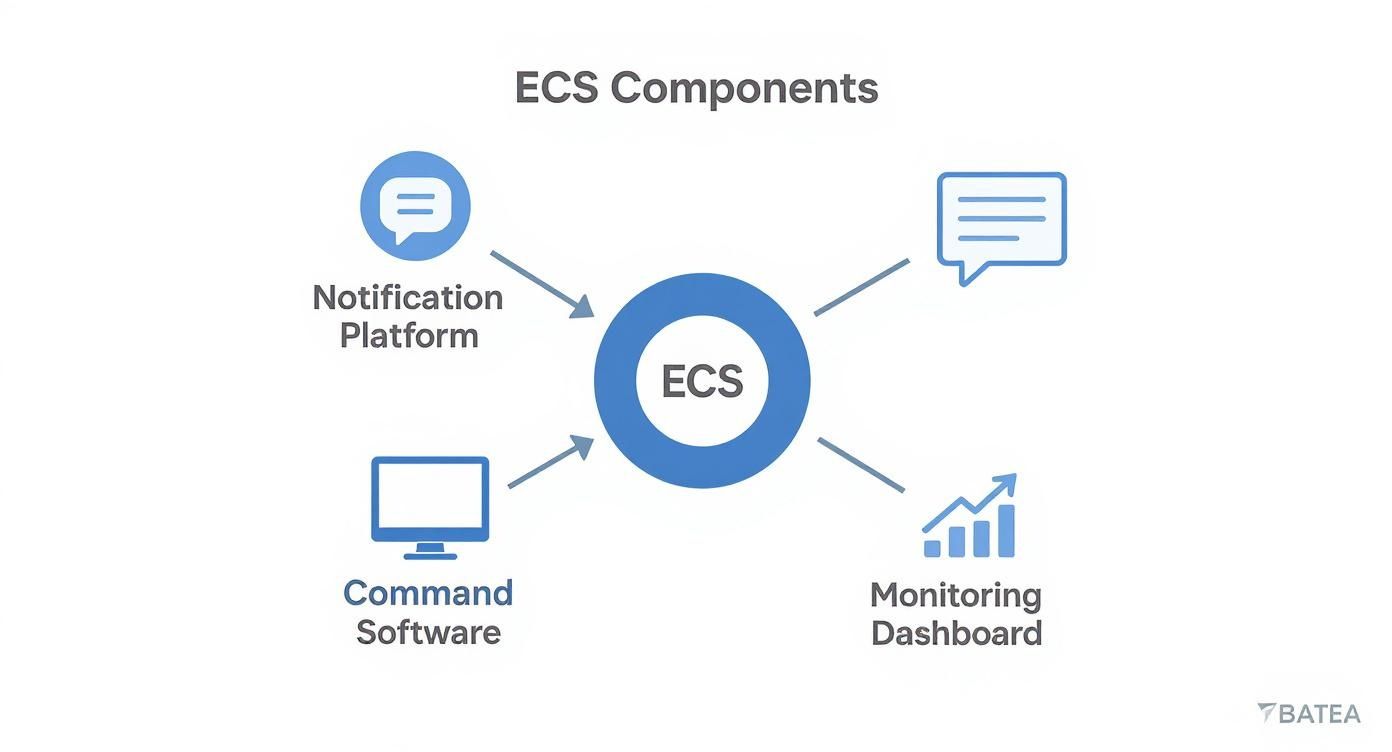
As you can see, every element—from the notification platform to the command software and the monitoring dashboard—has its own job but is completely connected to the others. It's this seamless teamwork that makes a response successful.
Multi-Channel Notification Platforms
The first component you'll notice is the multi-channel notification platform. This is the engine that gets your message out. It’s built on the simple truth that you can't just send one email during a crisis and hope for the best.
Instead, a multi-channel platform pushes alerts across several channels at once, casting a wide, intelligent net to maximize the chances of everyone getting the message. This typically includes a mix of:
- SMS Text Alerts: For instant, hard-to-miss messages that get opened 98% of the time.
- Voice Calls: Automated calls can deliver a pre-recorded message to landlines and mobile phones, reaching people who might not have a smartphone.
- Email Notifications: Ideal for sending more detailed instructions, follow-up information, and updates after the immediate danger has passed.
- Push Notifications: Direct alerts sent to people’s devices through a dedicated mobile app.
- On-Site Systems: Tying into hardware you already have, like digital signs, sirens, and public address (PA) systems.
This layered strategy is designed to overcome common roadblocks, whether it’s spotty cell service in one corner of the property or simply the fact that people aren't checking their email during an evacuation.
When you're evaluating systems, the features can seem overwhelming. This table breaks down what's truly essential.
Essential Features of an Effective Emergency Communications System
| Feature | Description | Why It Matters for Your Property |
|---|---|---|
| Multi-Channel Delivery | Sends alerts via SMS, voice, email, and push notifications simultaneously. | You can’t predict how people will receive a message. This ensures you reach the most people, regardless of their location or device. |
| Two-Way Communication | Allows recipients to reply to alerts (e.g., "SAFE" or "NEED HELP"). | This gives you instant feedback and situational awareness, turning a one-way blast into a real conversation with your community. |
| Audience Segmentation | Ability to create and message specific groups (e.g., tenants in Building C). | Prevents alert fatigue. You can send targeted, relevant information only to those who need it, making them more likely to pay attention. |
| Geofencing | Sends alerts to people within a specific geographic area. | Crucial for large properties or location-specific threats. You can warn people in a danger zone without panicking the entire campus. |
| Pre-Built Templates | A library of pre-scripted messages for common scenarios (fire, weather, etc.). | Saves critical seconds. When you’re under pressure, you don’t want to be writing a message from scratch. Just pick a template and send. |
Having these core features means your system is built not just for sending alerts, but for genuinely managing a crisis from start to finish.
Centralized Command and Control Software
If the notification platform is the engine, then the centralized command software is the cockpit. This is the simple, user-friendly interface where your team—or a trusted partner like Overton Security—can manage an entire crisis from a single screen.
From this command center, you can:
- Deploy Alerts Instantly: Launch pre-written or custom messages to your entire property or to specific, targeted groups in seconds.
- Manage Contact Groups: Easily sort your audience into logical groups like "Building A Tenants," "East Wing Staff," or "Parking Garage Visitors" to keep information relevant.
- Coordinate Response Actions: Directly dispatch security patrols, notify emergency services, and communicate with your team on the ground, all from one place.
A well-designed command center is all about simplifying decisions when the pressure is on. It provides the clarity and control to manage an incident, not just react to it.
This centralized control keeps your message consistent and cuts through the confusion that arises when communication is disorganized.
Real-Time Monitoring and Reporting
The final critical piece of the puzzle is the real-time monitoring and reporting dashboard. This is what gives you vital situational awareness while an event is happening. It's one thing to send a message; it's another to know if it was received and what’s actually going on across your property.
A solid monitoring dashboard lets you track message delivery rates, see who has acknowledged an alert, and get live updates from security personnel in the field. This capability becomes incredibly powerful when paired with other security technology. For example, by integrating your ECS with a remote video monitoring solution, your team can visually confirm what's happening from the security operations center while sending out highly targeted alerts.
This combination of active communication and passive monitoring gives you the full operational picture. It transforms your emergency communications system from a simple alert tool into a smart, dynamic response hub that protects people and property with greater efficiency.
The True Cost of a Communications Failure
During a crisis, the line between a controlled response and chaos is often drawn by one thing: how quickly and clearly you can communicate. If you're a property manager, facilities director, or business owner, considering what happens when that communication fails isn't just a thought exercise—it's a critical part of risk management.
When a notification is late, confusing, or never arrives, the fallout can be severe. These are not abstract what-ifs; they are real failures with tangible costs that impact safety, operations, and your bottom line.
Why Outdated Methods Fail Under Pressure
Many properties still rely on communication methods that buckle under pressure. Manual phone trees, disorganized email chains, and simple word-of-mouth are recipes for trouble when every second counts.
Imagine trying to call every tenant in a high-rise building during a fire alarm. By the time you’ve dialed the fifth number, the situation on the ground could have changed entirely. These older processes are slow, prone to human error, and create dangerous information gaps that breed confusion and panic.
In an emergency, silence and confusion are your biggest enemies. A communications failure creates a vacuum that is quickly filled by fear, misinformation, and uncoordinated actions, putting people directly in harm's way.
This is a more widespread issue than many realize. A recent report found that 63% of corporate security and safety leaders point to outdated, manual processes as the cause of delayed emergency notifications. That statistic should be a major red flag for any organization not using a modern emergency communications system. You can dive deeper into the numbers by checking out the full 2025 emergency response report.
The Real-World Financial and Reputational Risks
A breakdown in communication goes well beyond the immediate safety threat. For any business or residential community, the aftershocks can have serious, long-lasting consequences.
Financial Impacts from a Failed Response:
- Operational Downtime: Every minute your business isn't running due to an unmanaged incident is lost revenue. Poor communication extends the confusion, slows down recovery, and increases the financial impact.
- Liability and Legal Costs: After an incident, failing to provide timely and clear warnings can expose your organization to significant legal liability. Conversely, having a reliable system in place is a powerful way to demonstrate that you took proactive steps to mitigate risk.
- Property Damage: A slow or disorganized response can worsen physical damage. For example, a slow alert for a burst pipe is the difference between mopping up a puddle and dealing with a catastrophic flood that damages multiple floors.
Long-Term Damage to Your Reputation:
- Erosion of Trust: Tenants, employees, and customers need to feel safe. When an emergency is mishandled, that trust is shattered. This can lead directly to higher tenant turnover and make it difficult to attract new residents or clients.
- Negative Public Perception: Incidents that are managed poorly often attract negative media attention. The story can quickly become one of negligence, leaving a lasting stain on your property's or company's reputation.
When you add it all up, the true cost of a communications failure is measured in delayed evacuations, confused first responders, and crippling operational disruptions. An accountable, real-time emergency communications system isn't just a nice-to-have; it's the tool that transforms a chaotic event into a managed response—a direct investment in safety, business continuity, and peace of mind.
How to Integrate Communications with Security Operations
An emergency communications system becomes truly powerful when it’s woven directly into your daily security operations, turning it into an active partner for your on-site security officers and mobile patrols.
Instead of just blasting out a warning, the system becomes the central nervous system for your entire response. Imagine an alarm triggers in a building lobby. Instantly, the ECS notifies tenants while simultaneously dispatching the nearest GPS-enabled patrol vehicle to the exact location, all without human delay.
Practical Scenario Walkthrough
Let's break down how this looks in the real world for a property manager:
- Automated Alert Triggers: The system detects an intrusion or fire alarm.
- Tenant Notifications: Within seconds, SMS and voice alerts are sent to everyone in the affected area with clear instructions.
- Patrol Dispatch: The closest security officer unit immediately receives GPS-based directions to the scene.
- Real-Time Details: Arriving officers can see incident notes and updates on their mobile dashboard before they even get out of their vehicle.
- Digital Reporting: All incident data is automatically logged and uploaded to the Security Operations Center (SOC) for accountability.
The result? A security officer arriving on the scene already knows exactly where to go and what they’re walking into. This approach dramatically reduces response times and cuts through the uncertainty that often plagues the first few minutes of an incident.
Benefits of a Unified Response
This level of integration is a game-changer for property security. Based on our 26 years of experience, we've seen it drive up to a 90% faster response compared to older, manual processes. It also gives your entire security team a massive boost in situational awareness.
A well-integrated system transforms scattered notifications into a coordinated operation, giving your officers the clarity they need to act decisively.
This synergy creates tangible advantages across the board:
- Faster Incident Containment
- Improved Officer Safety
- Comprehensive Digital Incident Reports
- Streamlined Communication with First Responders
Implementing the Integration
So, how do you weave an ECS into your existing security operations? It begins with a detailed assessment. You need to map out your current security officer routines, patrol schedules, and the technology you already have on-site.
Next, you'll want to choose a platform that supports both your mobile teams and fixed security tools. Ensure it can push alerts to everything from two-way radios and smartphones to the dashboards in your patrol vehicles.
- Provide Hands-On Training: Show your officers how to use mobile alerts and reporting features until it's second nature.
- Test Regularly: Don't wait for a real emergency. Conduct drills that simulate alarms and patrol responses.
- Refine Protocols: Use what you learn from drills to fine-tune your message templates and dispatch rules.
As you build out your command structure, you might want to learn more about how a central hub can provide 24/7 oversight. For a deeper dive, check out our guide on the global security operations center.
When planning your integration, it's also critical to understand the protective measures built into these systems. For a look at industry best practices, this resource offers a great overview of security considerations for emergency communication systems.
Key Integration Considerations
| Component | Priority | Benefit |
|---|---|---|
| Guard Deployment | Ensure real-time alert visibility | Officers arrive informed and prepared to act. |
| Mobile Patrol Dispatch | Leverage GPS-enabled routing | Minimizes travel time on large or complex sites. |
| Central Command Access | 24/7 dashboard connectivity | Monitors all alerts and acknowledgments for full accountability. |
| Digital Reporting Tools | Automatic incident data capture | Builds accurate audit trails for liability and review. |
Best Practices to Sustain Integration
Once the system is in place, the work isn't over. Ongoing refinement is key to its success.
- Review Communication Protocols Quarterly: Keep your message templates fresh and relevant for different emergency types.
- Maintain a Low Manager-to-Client Ratio: Our hands-on leadership ensures your team and the system's dispatch workflows stay perfectly aligned.
- Blend Human Expertise with Tech: Technology is a powerful tool, but it doesn't replace good judgment. Encourage officers to verify alerts and add their on-the-ground context.
By truly aligning your ECS with your human-led security team, you create an environment where technology supports professional expertise. Your officers become active participants in the communication flow, not just passive recipients of an alarm.
Next Steps for Full Integration
After the initial setup, schedule regular reviews to keep optimizing your workflows. Use the data from your SOC to find opportunities for improvement.
- Analyze Response Times: Track the time from incident detection to officer arrival.
- Update Communication Protocols: Refine message templates based on real-world feedback.
- Expand Coverage: As your property grows, integrate new sensors, cameras, and access points.
These steps ensure your team is getting the full power out of your integrated system. Continuous improvement is what keeps your property safe and your security operations agile.
Example Case Study
A mixed-use complex in Los Angeles provides a perfect example. On-site security officers, equipped with our integrated ECS, reported a major water main break. The system instantly alerted the maintenance staff while simultaneously routing the nearest patrol unit to the scene.
Thanks to the precise GPS instructions, the officer was able to locate and isolate the leak in minutes, preventing catastrophic flooding in the ground-floor residential units.
This outcome shows just how powerful integrated communications can be. When patrols and alerts work in concert, you can safeguard property and people with incredible efficiency. With the right planning, training, and technology, your emergency communications system will stop being a tool that sits on a shelf and become the driving force behind every response.
Selecting the Right System for Your Property
Choosing an emergency communications system isn't like buying a new printer for the office. It’s a significant decision that directly impacts the safety and well-being of everyone on your property. For property managers, HOA boards, and facilities directors, the goal isn't just to find a product—it's to find a solution that fits your unique vulnerabilities and operational needs perfectly.
A common mistake is to start by comparing feature lists. A much better approach is to begin with a straightforward needs assessment. This means asking practical questions to get to the heart of what your property actually requires to keep people safe and informed.
Key Questions to Guide Your Selection
Before you look at a single piece of software, take the time to answer these fundamental questions about your environment. This groundwork ensures you invest in a system that solves your real-world problems, not one that just looks good in a sales demo.
-
What are our property's unique vulnerabilities? Think about everything from regional threats like wildfires or floods to site-specific risks like power outages, a chemical spill in an industrial park, or security threats at a shopping center. A community in a high-risk flood zone has completely different communication priorities than a downtown high-rise concerned with building access.
-
Who are our primary audiences? A great emergency communications system must reach everyone, but your "everyone" is different from the next property's. Are you trying to reach residential tenants, commercial employees, construction crews, or weekend shoppers? Knowing your audience tells you which channels—like SMS, voice calls, or an on-site PA system—are non-negotiable.
-
How must the system scale with our operations? Your property isn’t static, and your communication system shouldn’t be either. Consider future construction, potential growth in tenant numbers, or plans to expand a commercial footprint. The right system needs to be flexible enough to grow with you, making it easy to add new buildings, zones, and contact groups without a complete overhaul.
A thoughtful, tailored approach is the hallmark of a responsible security strategy. The best emergency communications system is one that feels like a natural extension of your property’s specific safety and operational protocols.
This forward-thinking approach is becoming more important every year. The incident and emergency management market is expected to grow dramatically, from $159.7 billion in 2025 to $297 billion by 2035. This growth is driven by a clear need for smarter, more connected alerting systems that can truly reduce risk. You can dig into more of the data on these trends in Fact.MR's detailed report.
Aligning System Features with Your Environment
Once you have a clear picture of your property's needs, you can start matching them to specific system features. The goal is to find a solution that offers genuine reliability and quality, reinforcing the hands-on, service-first approach that defines good property management.
For a Residential Community or HOA:
- Must-Haves: You'll need multi-channel delivery (SMS is key for residents), the ability to segment audiences by building or floor, and an easy-to-use mobile app for tenants to sign up.
- Key Consideration: The system should feel like part of the community, integrating with existing resident portals and being simple enough for people of all tech-comfort levels to use.
For a Commercial or Retail Property:
- Must-Haves: Look for geofencing to alert shoppers in a specific area, integration with your on-site security patrol’s workflow, and pre-built message templates for common issues like active threats or unexpected store closures.
- Key Consideration: The system must be powerful enough to handle high-density crowds and connect with your physical security hardware. You can learn more about how this works in our guide on access control best practices for commercial sites.
For a Construction Site:
- Must-Haves: You need a rugged, mobile-first platform that works in tough environments, two-way communication for safety check-ins, and the ability to send alerts in multiple languages to accommodate a diverse workforce.
- Key Consideration: The system has to be adaptable. A construction site’s layout and workforce are constantly changing, so you need reliable communication where traditional infrastructure might not even exist.
Common Questions About Emergency Communications Systems
As a property manager, HOA board member, or facilities director, you know that exploring new technology brings up plenty of questions. An emergency communications system is a significant investment in the safety of your property and everyone in it. To provide some clarity, we’ve gathered answers to the questions we hear most often from decision-makers like you.
Our goal is to give you straightforward answers that explain not just the technology, but how it works in the real world to protect your community and make your property more resilient.
How Difficult Is It to Implement a New System?
We understand. The last thing you need is another disruptive, overly technical project. Many managers worry that implementing a new communications system will be a major headache.
The reality is, with the right partner, the process is designed to be smooth and efficient. While complexity varies, a quality security provider handles the details from start to finish. At Overton Security, we begin with a detailed site assessment to understand your property's unique layout and infrastructure. From there, we help you select the right technology, manage the installation for total coverage, and provide thorough training for your staff.
Our hands-on leadership team oversees the technical aspects, allowing you to stay focused on your day-to-day responsibilities. The goal is always a seamless addition that enhances your security, not a disruptive overhaul.
Can We Customize Alerts for Different Emergencies?
Absolutely—in fact, you should. Customization is what makes an emergency communications system truly effective. A one-size-fits-all alert doesn't work; the proper response to a fire is completely different from the instructions for a tornado warning.
You can create pre-written message templates for a variety of situations, such as:
- A fire alarm requiring immediate evacuation.
- A severe weather warning instructing people to shelter in place.
- A water leak or utility outage on a specific floor.
- A security issue, like an unauthorized person on the property.
Having these templates ready allows you to send clear, pre-approved instructions in seconds when you're under pressure. It saves critical time and reduces the risk of human error.
Customization extends beyond the message. You can also set up specific contact groups so that alerts only go to the people who need them. This avoids "alert fatigue" and demonstrates to your residents or employees that you have a professional, well-thought-out safety plan.
For example, a message about a water leak on the third floor can be sent only to those tenants, while a building-wide evacuation alert goes to everyone. That level of precision makes your communications far more effective.
What Is the Role of Security Officers in Managing the System?
This is an excellent question because it gets to the heart of how technology and human expertise must work together. Our security officers are the essential human element that makes the system truly effective during a crisis. The system can send a message in a split second, but our officers are the "eyes and ears on the ground."
Their role includes:
- Verifying Alerts: Is an automated sensor alert a real fire or just burnt popcorn? An officer on-site can confirm instantly, preventing unnecessary panic.
- Assisting with Evacuations: They guide people to safety, direct the flow of traffic, and help anyone who needs extra assistance.
- Guiding First Responders: Officers can meet first responders and provide them with the latest on-the-ground intelligence, directing them exactly where they need to go.
- Providing Real-Time Updates: Our officers are in constant communication with our 24/7 Security Operations Center (SOC), feeding live information back to the command team.
We invest in training our professional officers to use the system’s mobile tools, so they can communicate effectively and file digital reports right from the field. This ensures every response is coordinated, intelligent, and fully documented.
How Do We Ensure Everyone Is Enrolled?
A communication system is only as good as its contact list. Achieving high enrollment from tenants or employees is crucial. The key is to communicate clearly and make the sign-up process as simple as possible.
We always recommend a multi-step approach for the best results:
- Make It Part of Onboarding: Build enrollment directly into the move-in or hiring process. Make it a standard step for every new person.
- Communicate the "Why": Don't just tell them to sign up; explain the safety benefits. Frame it as a tool for their personal protection.
- Use Multiple Reminders: Send friendly reminders in emails, newsletters, and even on signs around the property to reach anyone who hasn't enrolled yet.
- Keep It Simple: The sign-up process should take just a couple of minutes on a phone. The easier it is, the more people will participate.
By proactively managing enrollment and reinforcing its importance, you build a powerful database that ensures your critical alerts reach as many people as possible when it counts the most.
Navigating the world of security technology can feel overwhelming, but you don’t have to do it alone. For over 26 years, Overton Security has helped property managers and business owners across California implement security solutions that blend smart technology with reliable, professional service. If you have more questions or want to discuss a security assessment for your property, contact us today to see how our experience can protect what matters most to you.