
A perimeter sensor trips at 1:47 a.m. in a Class A office tower. The dispatcher is already handling two calls, and the nearest guard post stays unstaffed for seven minutes. The property manager may never see the alert itself, but they'll feel the consequences if nobody verifies the door, checks the camera, or reaches the affected area.
That's the practical question behind security operations center automation. Can technology shorten the response window without adding headcount or removing the judgment of trained officers? For property managers, facilities directors, HOA boards, and construction leaders, the answer depends less on buying a platform and more on building reliable handoffs between sensors, remote operators, and people in the field.
What This Guide Will Help You Decide
SOC automation is often presented as a cybersecurity project, but the operating problem is familiar to anyone responsible for a building or site. A residential gate produces an access denial, a loading dock camera detects movement, or a fire panel sends an alert while the on-duty officer is checking another area. The issue isn't only that alarms exist. It's that the right person may not receive the right information quickly enough.
This guide treats automation as a decision aid, not a product pitch. It explains what a security operations center automates, where the technology helps, and where human judgment remains essential. It also connects enterprise security concepts to everyday work at residential communities, retail centers, construction sites, office buildings, medical campuses, parking facilities, and mixed-use properties.
A useful starting point is understanding what a security operations center does. From there, you can evaluate five practical questions:
- What should happen automatically? Repetitive alert sorting, data collection, video retrieval, and routine notifications are strong candidates.
- What requires a person? Investigation, tenant interaction, de-escalation, physical verification, and use-of-force decisions still need trained professionals.
- Can your systems communicate? Cameras, access control, intrusion panels, radios, and reporting tools must exchange dependable information.
- Can you measure the result? Response time, false alarms, alert handling, and documentation should be visible in regular reports.
- Is your site ready for a pilot? A manageable set of alerts, clear post orders, reliable connectivity, and an accountable owner create a better starting point than a broad technology rollout.
By the end, you should be able to distinguish automation from autonomy, compare the trade-offs for your property, identify useful first workflows, and judge whether automation can strengthen your existing onsite security officers and remote monitoring program.
What SOC Automation Actually Means
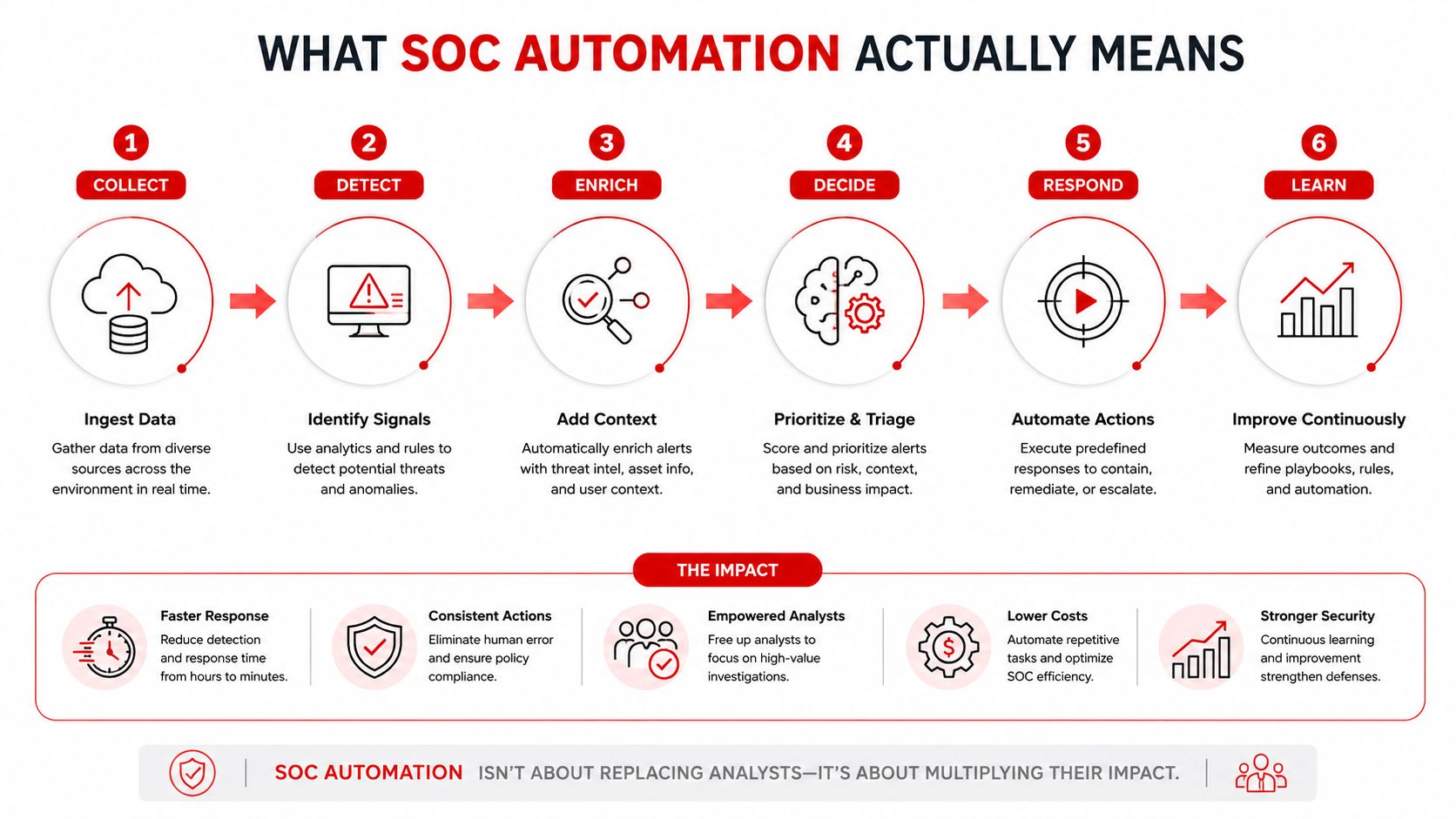
Think of a security operations center dispatcher with a well-worn playbook. When a door-forced alarm arrives, the dispatcher knows which camera to open, which access record to check, which officer to call, and when to escalate. SOC automation performs those repeatable steps through connected software, while a human analyst supervises the process and handles exceptions.
The system begins with event ingestion, which means collecting signals from cameras, access-control readers, intrusion panels, intercoms, vehicle gates, and environmental sensors. A SIEM stores and correlates security information. A SOAR platform runs response playbooks. A PSIM can present physical security events in a property-focused interface, tying alarms to maps, cameras, procedures, and contacts.
The next layer applies rules, analytics, or AI scoring. Instead of presenting one motion event, one badge denial, and one camera-loss notification as three unrelated alarms, the system can associate them with the same location and time period. That gives the dispatcher a more useful incident record and reduces the need to search through separate screens.
Automation is not autonomy
A playbook might automatically pull nearby video, attach the tenant or employee access record, notify the remote monitoring team, and recommend dispatching a mobile patrol. A human operator can then confirm whether the alert shows a person, a delivery, a maintenance worker, or an equipment fault.
That distinction matters. Automation handles repetitive triage, but people retain responsibility for context, communication, escalation, and physical actions. A system may suggest locking a door. An authorized operator or onsite officer still needs to consider whether someone could be trapped inside, whether a vendor is expected, and whether the action fits the property's post orders.
Benefits and Honest Trade-Offs of Automation
The strongest case for automation is operational, not futuristic. Machines can sort high-volume events without becoming tired, while trained personnel spend more time on incidents that require context. A major SANS survey on security operations automation found that 59% of security operations teams use more than 10 security tools in the SOC, and 68% said the engineering effort required to deploy and maintain automation was the hardest part of SOAR adoption.
The same survey found practical adoption in repetitive workflows. 52% of organizations had automated phishing response, 43% had automated vulnerability management, and 42% had automated data enrichment. It also reported that 45% were targeting automation for at least half of incident response, while another 35% were targeting at least 75%. These findings support a measured conclusion for property leaders: automation is becoming an operating model, but it still requires engineering, tuning, and ownership.
A separate review of SOAR use in hybrid-cloud SOC workflows reports that automated triage and containment can improve response efficiency by about 50%. An experimental SOAR study cited in the same verified data reported MTTD falling from 22 minutes to 8 minutes and MTTR from 95 minutes to 28 minutes. Those results point to the main mechanism, reducing queueing, manual enrichment, and repetitive containment steps.
| Benefit | Honest Trade-Off |
|---|---|
| Faster alert triage and dispatch | Poorly tuned rules can multiply false positives |
| Less alarm fatigue for officers and dispatchers | Staff still need to review exceptions and unusual conditions |
| Consistent procedures across shifts and properties | Rigid playbooks can frustrate legitimate after-hours vendors or tenants |
| Better incident records for insurance and liability reviews | Integrations with older cameras and access systems may require substantial work |
| Broader monitoring coverage | Scaling workflows creates an ongoing maintenance burden |
| Faster collection of video, access, and location data | Bad source data can produce confident but incorrect recommendations |
Practical rule: Automate the steps that are repetitive and reversible first. Keep actions involving safety, legal exposure, tenant conflict, or physical force under human control.
Automation also doesn't eliminate trained personnel. Officers interpret conditions, speak with residents, de-escalate confrontations, verify physical spaces, and make decisions that software can't safely own. The right goal is more consistent support for human work, not a promise that a property can operate without people.
Where SOC Automation Shows Up on Real Properties
At a residential community, a vehicle approaches the gate after hours. License plate recognition can compare the plate with an approved or restricted list, attach the result to the event, and alert the remote monitoring team. If the vehicle isn't approved, the system can route the matter to a roving patrol officer instead of sending that officer to every ordinary gate movement.
A retail center presents a different pattern. Loitering analytics near a loading dock can notify the officer assigned to that area, while the SOC correlates after-hours motion with available point-of-sale or access information. The officer receives a location and reason for dispatch, rather than a vague instruction to “check the property.”
At a construction site, a camera detects movement near stored equipment at 2 a.m. Analytics can compare the movement with the site schedule and nearby camera views. The remote operator may issue an audible warning through a speaker, conduct a talk-down, and then decide whether to summon the site guard or contact local police under the approved escalation plan.
A Class A office tower benefits from context. A badge anomaly, an elevator access event, and a stairwell camera notification can be presented to a dispatcher as one building incident. The dispatcher can then contact the concierge officer, mobile patrol, building engineer, or property representative with the relevant floor, door, camera, and access information already attached.
| Property Type | Common Automated Trigger | Typical SOC Response |
|---|---|---|
| Residential community | Unrecognized license plate or gate denial | Check the watchlist, review video, notify remote monitoring, and dispatch patrol when appropriate |
| Retail center | Loading-dock loitering or after-hours motion | Page the assigned officer, correlate nearby activity, and document the response |
| Construction site | Perimeter breach detected by analytics | Use audio talk-down, review video, and escalate to the site guard or police according to post orders |
| Class A office tower | Badge anomaly combined with door or camera event | Attach building context, notify the correct dispatcher, and route an officer to the affected area |
The common thread is selective response. Automation doesn't send every alert to every officer. It helps determine which event deserves attention, what information the responder needs, and whether the situation can be resolved remotely or requires someone onsite.
A Practical Roadmap for Rolling Out Automation
A property manager doesn't need to automate every system at once. A controlled rollout produces better information and makes it easier to correct bad assumptions before they affect live operations.
Start with discovery
Inventory every alarm source, camera, access-control panel, intercom, radio channel, environmental sensor, and guard reporting tool. Then ask officers which alerts consume their time without producing useful action. Their experience often reveals gaps that a system diagram misses, such as a camera pointed at glare, a door contact that fails during weather changes, or a gate alert that lacks a usable location.
Design a small set of playbooks
Choose the highest-volume, most repeatable alerts first. For each one, write the workflow in plain language:
- Define the trigger. State exactly what event starts the process.
- Name the owner. Identify the dispatcher, remote operator, guard, supervisor, or property contact responsible for the next action.
- Set the verification step. Specify which camera, access record, call, or patrol check confirms the event.
- Write the escalation path. Include what happens when the first responder can't acknowledge or resolve the alert.
- Record the closeout. Require the system to capture the action, time, result, and supporting evidence.
Integrate and test before going live
Connect the alarm panel, video management system, and access control to one automation console where possible. Test every playbook against historical footage and known false alarms before enabling live actions. A workflow that looks logical on paper may fail because a camera label is outdated, an access feed arrives late, or a patrol contact isn't available at night.
Measure before expanding
Track dwell time, false-alarm rate, and guard response time each week. Once the foundation is stable, add analytics, license plate recognition, after-hours patrol routing, or other workflows that address a demonstrated operational need.
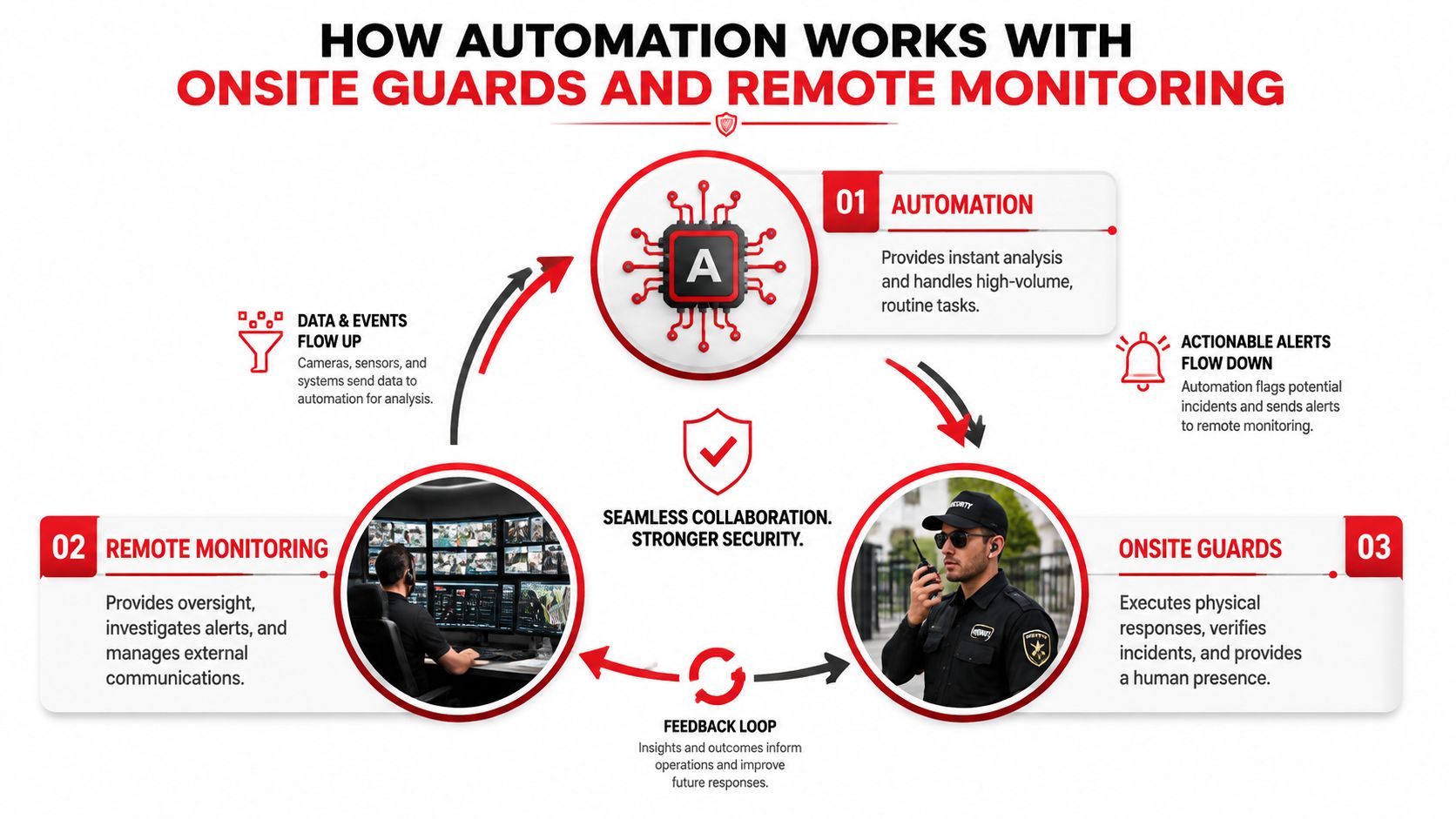
This is a multi-quarter operating project, not a single software purchase. The system needs an owner, periodic playbook reviews, officer feedback, integration maintenance, and a process for retiring workflows that no longer match the property.
How Automation Works With Onsite Guards and Remote Monitoring
Automation, remote monitoring, and onsite officers form three layers of one defense system. Each layer has a different job, and problems arise when a property asks one layer to perform another layer's work.
Automation handles high-volume, low-judgment tasks. It can read motion events, compare badge activity with door-forced alarms, collect nearby video, and route the alert to the appropriate person. It doesn't understand every social or physical detail of an incident, so it should support decisions rather than make irreversible ones.
Remote monitoring operators add visual confirmation and communication. They can review live or recorded video, speak through a site speaker, contact a tenant or vendor, notify a supervisor, and coordinate with the property's escalation contacts. Their value comes from interpretation and communication, not watching screens.
Onsite guards provide the physical presence. They can check a stairwell, escort a tenant, secure a gate, preserve a scene, assist with access control, or coordinate with responding agencies. A remote operator can't replace those physical actions.
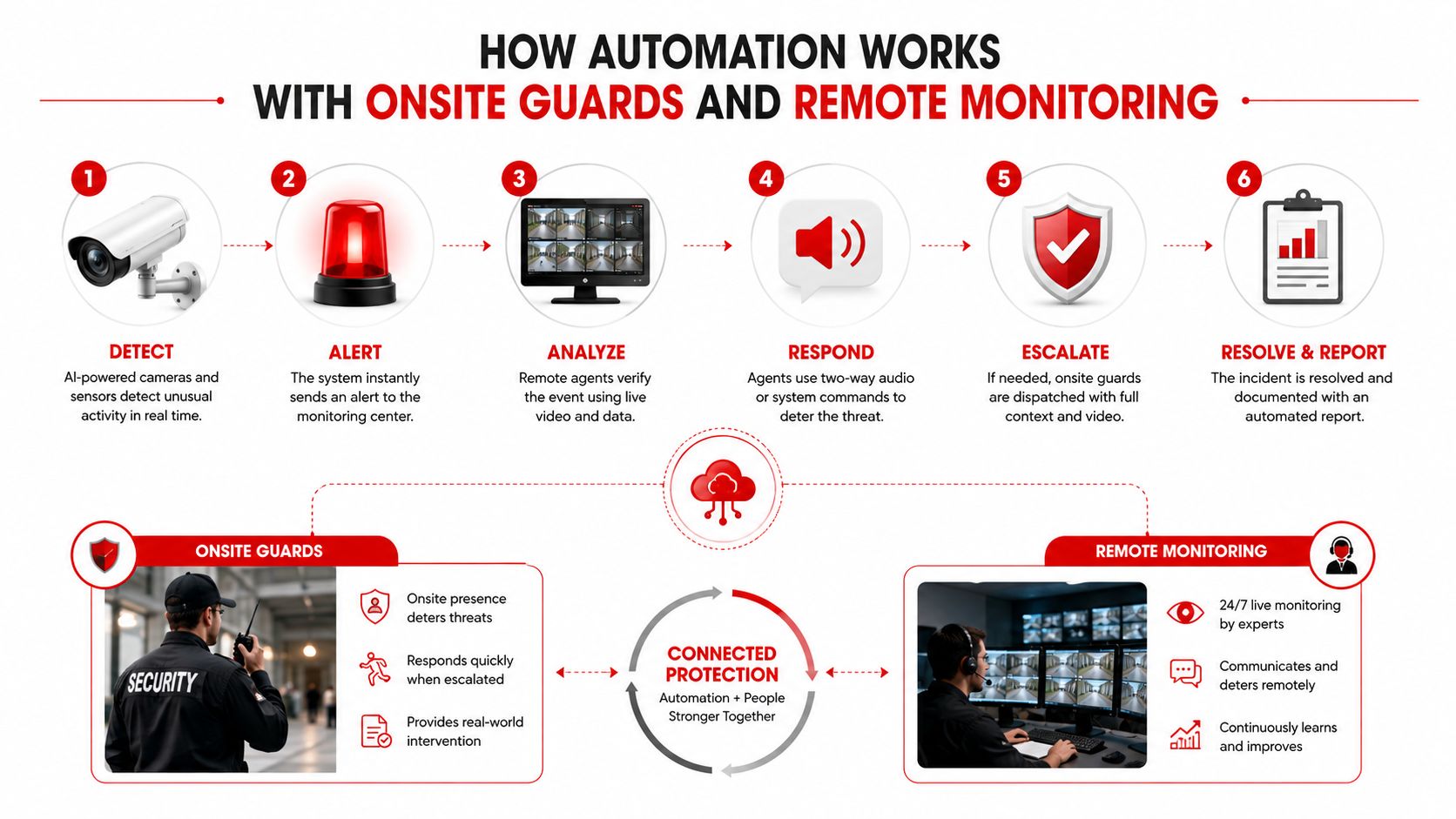
Consider a camera analytics alert at a parking structure. The software identifies movement in a restricted area and attaches the camera location. The remote operator checks the image, compares it with access activity, and uses the speaker to ask the person to leave. If the person remains or the situation appears unsafe, the operator dispatches an onsite officer with the precise level, entry point, and description.
The platform records the trigger, review, communication, dispatch, arrival, and resolution. That shared record gives the property manager a clearer account of what happened and helps supervisors identify whether the camera, playbook, operator, or patrol response needs improvement.
For properties evaluating remote video monitoring services, the important question isn't whether monitoring replaces patrol. It's whether the monitoring team and patrol officers can exchange information quickly, follow the same post orders, and document each handoff.
Metrics That Tell You If Your SOC Automation Is Working
A property leader doesn't need a dashboard filled with technical terms. They need evidence that the system reduces avoidable delay, directs officers more intelligently, and produces dependable records.
Mean time to detect, or MTTD, measures how long it takes to identify a relevant event. Mean time to respond, or MTTR, measures the time from detection to meaningful action. Mean time to contain, or MTTC, measures how long it takes to limit the incident. A SOC metrics reference lists benchmarks of MTTD under 24 hours, MTTR under 4 hours, MTTC under 72 hours, false-positive rate under 30%, and attacker dwell time under 21 days. Property teams should treat these as reference points, not universal promises, because a lobby alarm and a perimeter breach have different urgency.
| Metric | What It Measures | Target Range for Property SOC |
|---|---|---|
| MTTD | Time from the event to detection | Compare against the site's required response window |
| MTTR | Time from detection to meaningful response | Set by incident type and post orders |
| Automated alert handling | Alerts resolved without human intervention versus escalated | Increase only when quality remains acceptable |
| False-positive rate | Alerts that don't represent actionable incidents | Reduce through camera, rule, and schedule tuning |
| Incident resolution rate | Incidents closed with a documented outcome | Require complete records, not just alert closure |
Many platforms can collect these values from SIEM, SOAR, video, access-control, and case-management systems through APIs and scripts. Security reporting guidance describes automated data collection as a way to correlate alerts with assets, users, and threat-intelligence information while reducing manual reporting work. Ask vendors whether monthly reports show raw event times, operator actions, dispatch records, arrival times, and closeout notes.
Overton's security analytics platform information is one example of the type of reporting conversation property leaders can have with a security provider. The useful test is simple: can you identify where the delay occurred and what someone changed afterward?
Common Questions Property Leaders Ask About SOC Automation
Does automation replace onsite guards?
No. It reduces repetitive sorting and information gathering, while officers perform physical verification, access control, escorts, patrols, and incident response. The strongest model connects automation to remote operators and trained onsite guards rather than treating them as competing options.
What does automation cost each month?
There isn't a responsible universal figure for a mid-sized property. Cost depends on existing cameras, access systems, connectivity, monitoring coverage, integration work, analytics, staffing, and the number of sites. Request a total operating estimate that separates technology, implementation, monitoring, maintenance, and officer services.
How long does a rollout take?
A limited pilot can begin after the property documents its systems, selects repeatable alerts, writes post orders, and tests integrations. A broader program takes longer because teams must tune rules, train personnel, review results, and maintain workflows as the site changes.
What happens if the internet goes down?
A resilient design should define which local alarms continue operating, how officers receive fallback notifications, and how the SOC learns about the outage. Ask for an outage procedure, backup communications plan, and recovery record rather than assuming every cloud connection will remain available.
How is tenant privacy protected?
Use purpose-specific camera placement, restricted access, retention rules, role-based permissions, and documented review procedures. Property leaders should also confirm how video, access records, license plate information, and incident reports are stored, shared, and deleted.
What compliance obligations apply?
The answer depends on the property, jurisdiction, data involved, contracts, and industry. Regulated environments may require stronger access controls, audit trails, retention practices, and human approval for certain actions. Have counsel and compliance personnel review the design before activating sensitive workflows.
Automation works best as a layered system. It moves information quickly, remote operators apply judgment from a distance, and onsite guards take the physical action that screens and software can't provide.
Overton Security combines 24/7 SOC oversight, GPS-enabled patrol reporting, digital incident documentation, remote monitoring, and onsite security officers for properties across California. Visit Overton Security to discuss a practical automation and guard coverage plan for your residential community, commercial property, construction site, or multi-site portfolio.